
Opening/closing automatically from inside
 WARNING
Keep an eye on the area at the rear end of the
vehicle when operating the trunk lid/tailgate
with the remote operating switch on the door.
Monitor the entire closing procedure to ensure that there is no risk of injury to anyone near the vehicle.
Release the switch on the door to interrupt the closing procedure.
The remote operating switch can also be used if the SmartKey has been removed from the starter switch or the KEYLESS-GO key has been removed from the vehicle. Never leave children with no adult supervision in the vehicle or with access to an unlocked vehicle.
If unsupervised children have access to a vehicle, it could lead to an accident and/or serious injury.
WARNING
Ensure that the trunk lid/tailgate is closed
when the engine is running and the vehicle is
in motion. Among other dangers, deadly
carbon monoxide (CO) may enter the vehicle
interior and cause unconsciousness and even
death.
You can open and close the trunk lid/tailgate from the driver's seat when the vehicle is stationary and unlocked.
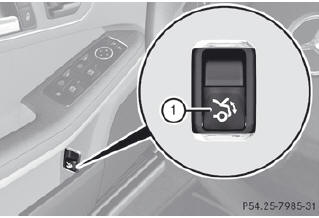
•► To open: pull remote operating switch for trunk lid/tailgate 1 until the trunk lid/ tailgate opens.
•► To close (Sedan): press remote operating switch for trunk lid 1 until the trunk lid is closed.
•► To close (Wagon): turn the SmartKey to position 1 or 2 in the ignition lock.
•► Press remote operating switch for tailgate 1 until the tailgate is closed.
See also:
Lap evaluation
This function is only available if you have
stored at least two laps and have stopped the
RACETIMER.
Press
or
on the steering wheel
to select the AMG menu.
Press the
button repeatedly ...
AMG vehicles with rear axle locking
differential
Your vehicle is equipped with a self-locking
differential on the rear axle. For better
protection of the differential on the rear axle,
carry out an oil change after a breaking-in
phase of 200 ...
Hiding/showing the navigation menu
To show: press the or
button
on the remote control.
To hide: press the or
button.
or
Wait for approximately eight seconds.
Navigation menu
1 Data medium type
2 Current track
3 ...