
Locking the vehicle (mechanical key)
If the vehicle can no longer be locked with the SmartKey, use the mechanical key.
•► Open the driver's door.
•► Close the front-passenger door, the rear
doors and the trunk lid/tailgate.
•► Press the locking button.
•► Check whether the locking knobs on the
front-passenger door and the rear doors
are still visible. Press down the locking
knobs by hand, if necessary.
•► Close the driver's door.
•► Take the mechanical key out of the
SmartKey
•► Insert the mechanical key into the lock of
the driver's door as far as it will go.
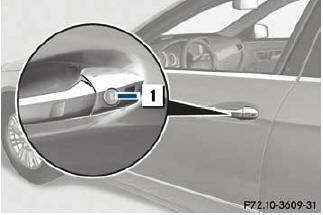
•► Turn the mechanical key clockwise as far
as it will go to position 1.
•► Turn the mechanical key back and remove
it.
•► Make sure that the doors and the trunk lid/
tailgate are locked.
•► Insert the mechanical key into the
SmartKey.
See also:
Changing gear
The automatic transmission shifts to the
individual gears automatically when it is in
transmission position D. This automatic
gearshifting behavior is determined by:
- a possible limitation of ...
Intelligent solutions promote excellent safety
The GL-Class makes full use of the advantages of its unitised body, combining
optimum strength with intelligent lightweight steel design. The result is
excellent passive safety. Combined with the ...
Xenon bulbs
If your vehicle is equipped with Xenon bulbs, you can recognize this by the following:
the cone of light from the Xenon bulbs moves from the top to the bottom and back
again when you start the eng ...