
Checking the battery
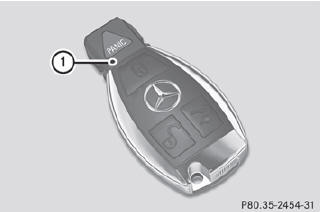
•► Press the  or
or
 button.
The battery is working properly if battery check lamp 1 lights up briefly If battery check lamp 1 does not light up briefly during the test, the battery is discharged.
•► Changing the battery
You can obtain the battery at a qualified specialist workshop.
i If the SmartKey battery is checked within
the signal reception range of the vehicle,
pressing the or
button locks or
unlocks the vehicle.
See also:
Stowage compartments in the rear
Stowage compartment in the rear center
console
► To open: briefly press the stowage
compartment marking.
Depending on the vehicle's equipment,
there may be open stowage spaces above
and ...
Resetting the panorama roof with power tilt/sliding panel and the roller sunblinds
Reset the panorama roof with power tilt/ sliding panel and the roller sunblinds
if the panorama roof with power tilt/sliding panel or the roller sunblinds do not
move smoothly.
Turn the SmartK ...
DIRECT SELECT lever
Overview of transmission positions
The DIRECT SELECT lever is on the right of the
steering column.
P Park position with parking lock
R Reverse gear
N Neutral
D Drive
The DIRECT SELECT lever ...